Photos, as the original file
Fanfix keeps the original of every photo, and that is the file you get — not a thumbnail or a re-compressed copy. Each one is named for its real format (Fanfix often serves WebP under a .jpg name), so it opens properly.
Fanripper saves the files Fanfix keeps — photos, videos with sound, audio and documents — straight from the tab you’re already signed into. Click Save on one item, or save a whole creator, a chat or your Gallery in one run. Included on Max and Lifetime.
Free to install. Fanfix works in the browser extension and the iPhone & Android app, and unlocks on Max or Lifetime — bought inside the extension or, from a phone, at app.fanripper.com.
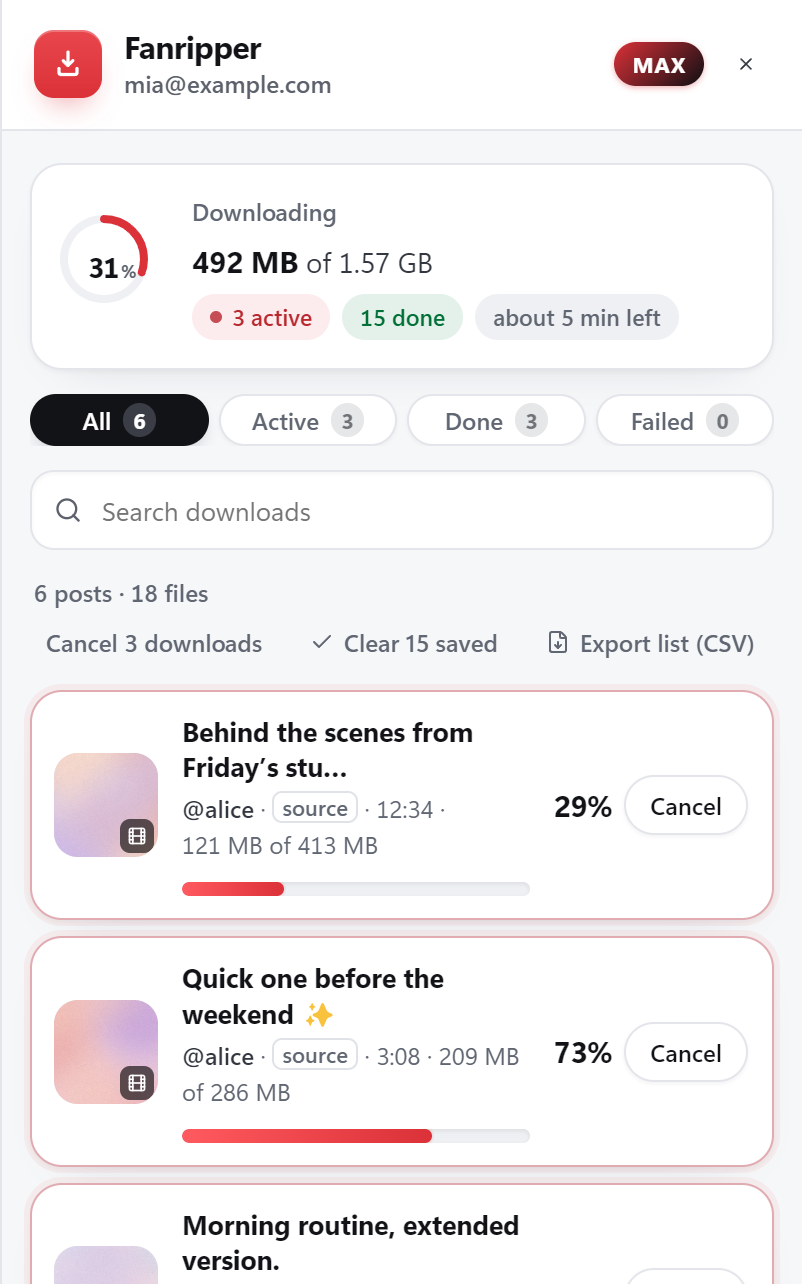
The same engine that handles OnlyFans, JustForFans and privacy.com.br, pointed at Fanfix. Every file lands in your ordinary Downloads folder, and a bulk run sorts it per creator into Posts, Paid, Messages, Gallery, Collections or Livestreams.
Fanfix keeps the original of every photo, and that is the file you get — not a thumbnail or a re-compressed copy. Each one is named for its real format (Fanfix often serves WebP under a .jpg name), so it opens properly.
Fanfix keeps one version of each video, and Fanripper saves that one as it is — sound included, never re-encoded. Some Fanfix videos come encrypted; those are decrypted on your own machine into a normal MP4.
A Save chip on every media message you have unlocked, and on each chat’s Gallery view. Save one chat, or every chat one after another.
On a creator’s profile, save everything you can see — or only the free posts, or only what you bought — and narrow it to photos, videos, audio or documents. Or queue every creator you subscribe to.
Everything you bought on Fanfix, by tab: images, videos, audio, livestream replays and documents. Pick the tabs you want and start it.
A bulk save reads Fanfix through your open Fanfix tab, one page at a time. Close the tab and the run waits; open Fanfix again and it carries on from where it stopped instead of starting over.
Save one item from its chip, or start a run from the Fanripper drawer and let it work through the lot.
Creator profiles
Every post you can see — or only free, or only purchased.
Posts and your feed
Single posts and the Following feed.
Chats
Each chat and its Gallery view — or all your chats in a row.
Your Gallery
Your purchases by tab — images, videos, audio, livestream replays and documents.
Collections
A creator’s collection, saved as one run.
All your subscriptions
Every creator you subscribe to, one after another.
Download the file, unzip it and load it from the extensions page of Chrome, Brave or Edge on your computer. There is no desktop app, no Python and no command line — and you only ever do this once.
Fanfix sits on the Max plan ($15/month) and on Lifetime ($99 once). You unlock it inside the extension, or from a phone at app.fanripper.com — no KYC, and nothing renews by itself.
Sign in at app.fanfix.io as you normally would. A Save chip appears on the photos and videos you can already open — click it for one item, or open the drawer to save a whole creator, a chat or your Gallery.
Fanfix is built into the Fanripper app too. Sign in to Fanfix inside the app — Fanripper never asks for your password — and tap Save on a post, a chat, your Gallery, a collection or a livestream replay. Videos come down as the MP4 Fanfix keeps, with sound, and photos as the original file — on the same Max or Lifetime plan, with no second purchase.
Runs inside Expo Go, a free app on the App Store and Google Play — no APK. It saves one file at a time while it’s open on screen. Open it only from fanripper.com/app.
The Free, Basic, Pro and Unlimited plans cover OnlyFans and Fansly. Fanfix — like JustForFans and privacy.com.br — sits on the two every-site plans.
$15/ month
$99once
Said plainly, up front. Live streams in progress can’t be saved — the livestream replays in your Gallery save like any other video. And posts or messages you haven’t unlocked are never downloaded: they are listed as locked, with their price, and Fanripper never buys, unlocks or tips anything for you.
One smaller thing: comments aren’t saved. And no honest tool can promise a site it doesn’t control will never change: Fanripper tells you the moment a fix ships, and updating is a 15-second re-load that keeps your settings and login. The fastest route to us is Telegram at @fanripper.
Yes. Fanfix is the fifth site Fanripper supports, alongside OnlyFans, Fansly, JustForFans and privacy.com.br. It saves photos, videos with sound, audio and documents from creator profiles, posts, your chats and your purchases Gallery — one item at a time, or a whole creator, chat or Gallery in one run. It works in the browser extension and the iPhone & Android app, on the Max and Lifetime plans.
Max ($15/month) or Lifetime ($99 once). Fanfix is not part of the Free, Basic, Pro or Unlimited plans — those cover OnlyFans and Fansly. Max and Lifetime add JustForFans, privacy.com.br and Fanfix, plus every new site we add.
The file Fanfix keeps. Fanfix stores one version of each video, so that is the one Fanripper saves — with its sound, never re-encoded — and photos come down as the original file. There is no hidden higher quality to unlock, and we won’t pretend there is.
Yes. Every media message you have unlocked gets a Save chip, and so does each chat’s Gallery view. From the drawer you can save one chat, or all of them one after another. Messages you haven’t unlocked are listed as locked and left alone.
Both. On a creator’s profile, save everything you can see, only the free posts or only the ones you bought — and narrow it to photos, videos, audio or documents. Your purchases Gallery saves by tab (images, videos, audio, livestream replays, documents), and you can queue every creator you subscribe to in one go. If the Fanfix tab closes, the run pauses and picks up where it stopped when you open Fanfix again.
Yes, on Max or Lifetime, in the Fanripper iPhone & Android app. Sign in to Fanfix inside the app and tap Save on a post, a chat, your Gallery or a collection — or back up a whole creator, a chat, your Gallery or every subscription from the Fanripper panel, paced to protect your account. The browser extension saves those too.
No. It works through the session already open in your browser — or, on a phone, the one you sign in to inside the app — and files are saved straight to your own device. We never ask for, see or store your platform credentials, and your media never passes through our servers.
No. Fanripper only saves what your account can already open. Posts and messages you haven’t unlocked are shown as locked, with their price, and never downloaded — and Fanripper never buys, unlocks or tips anything for you.
Install free on your computer or open the app on your phone, unlock Max or Lifetime, and save the original files — on your own device, without ever handing over a password.
Fanripper is an independent tool and is not affiliated with, endorsed by, or connected to Fanfix. Save only content you have lawful, paid access to.